Homework Assignment #2 — Test Automation
In this assignment you will use tools and AI to automatically create high-coverage test suites for different programs.
You may work with a partner for this assignment. If you do you must use the same partner for all sub-components of this assignment. (If your partner drops the class, you are still responsible for the full assignment and should plan for that risk accordingly.)
Thoughts From Prior Students
My favorite part has been HW2 with AFL and Randoop. Watching inputs mutate and seeing real crashes made testing feel real, not just theory. It also helped me understand coverage in a hands-on way.
In homework 2 running the tests took so long which was pretty annoying.
My favorite part of the class so far has been the test automation done in HW 2. It was very cool to be able to use real world tools in a way I haven't been able to do in other eecs classes.
Start Early
Professors often exhort students to start assignments early. Many students wait until the night before and then complete the assignments anyway. Students thus learn to ignore "start early" suggestions. This is not that sort of suggestion.
However, once running, the tools are completely automated. Thus, you can start them running overnight, sleep and ignore them, and wake up to results. (Unfortunately, there is no way to resume an interrupted Randoop session without restarting it from the beginning, so be careful about laptop power and the like.)
By contrast, using AI can take a variable amount of time. In a conversational interface, you may have many back-and-forth rounds to clarify what you want and refine the AI's answers. In a more agentic setting, you may have to wait for a long time (or spend many tokens) for the AI to generate and assess candidate tests. It can be tempting to end the AI activity very early (e.g., spend only a small amount of time may feel "productive") but that often correlates with lower-quality results.
This means that even though the assignment may not take hours of your active personal attention, you must start it days before the due date to be able to complete it in time.
You should also make a note of how long each activity took — both in terms of wall-clock time and in terms of how much attention you had to pay for it. That information will help with your final report.
Installing, Compiling and Running Legacy Code
It is your responsibility to download, compile, and run the subject programs and associated tools. Getting the code to work is part of the assignment. You can post on the forum for help and compare notes bemoaning various architectures (e.g., windows vs. mac vs. linux, etc.). Ultimately, however, it is your responsibility to read the documentation for these programs and utilities and use some elbow grease to make them work.
Subject Programs and Tools
There are two subject programs for this assignment. The programs vary in language, desired test type, and associated tooling.
PNG Graphics (C) + American Fuzzy Lop
The first subject program is libpng's pngtest program, seen earlier in Homework 1. This reuse has two advantages. First, since you are already familiar with the program, it should not take long to get started. Second, you will be able to compare the test cases produced by the black-box tool (called tool-generated tests) to the white-box test cases you made manually (called student-provided tests). (You'll have to recompile it with special flags, but it's the same source code.)
The associated test input generation tool is American Fuzzy Lop, version 2.52b. A mirror copy of the AFL tarball is here, but you should visit the project webpage for documentation. As the (punny? bunny?) name suggests, it is a fuzz testing tool.
You will use AFL to create a test suite of png images to exercise the pngtest program, starting from all of the png images provided with the original tarball. (We use the term developer-provided tests to refer to all of the test files that came inside the developer-written archive.) Note that you can terminate AFL as soon as you reach 510 paths_total (also called total paths in the GUI) — AFL does not stop on its own (instead, press Ctrl-C to stop it).
AFL claims that one of its key advantages is ease of use. We will consider four separate high-level steps in this dynamic analysis.
Step 1 — Seed images
AFL uses initial inputs you provide and mutates them to find new inputs that cover additional parts of the program. (For more information, see its documentation.) AI tools also benefit from starter examples. The initial inputs you provide are called seed inputs. Since we are testing libpng, the seed inputs are "images".
We provide a unified set of seed images for students to use. It is a subset of 36 of the images that come with libpng.
If you extract that archive into your libpng directory from HW1, and run the included compute-coverage.sh script, you should see something like this:
ubuntu:~/src/libpng-1.6.34$ bash compute-coverage.sh
testing 36 seed-images/ files
Lines executed:32.64% of 11309
As always, don't worry if your numbers are different.
Step 2 — Compile AFL
Follow along with AFL's quick start guide. Extract the AFL tarball (to its own directory) and run "make".
You must compile and run AFL on the remote EC2 machine from HW0. You can use SSHFS to edit files, but you must ssh into the EC2 machine to actually compile and run AFL.
Note that this results in files such as afl-gcc and afl-fuzz, which we will use in subsequent steps.
Step 3 — 'Instrument' a new copy of libpng
Do not re-use your HW1 folder of libpng. (It is possible, but leads to much confusion.) Instead, download a fresh copy of the reference implementation (version 1.6.34) here and place it in a new folder for Homework 2 (e.g., HW2).
Change to the new libpng-1.6.34 directory and re-configure libpng with a special configure line like this:
$ CC=/REPLACE/THIS/TEXT/WITH/YOUR/PARTICULAR/PATH/TO/afl-gcc_(don't_just_copy_this_in_unchanged) ./configure --disable-shared CFLAGS="-static"
$ make
The "CC" bit will look something like (but maybe different for you) CC=/home/ubuntu/eecs481/hw2/afl-2.52b/afl-gcc — note that there is no trailing slash. If you see configure: error: C compiler cannot create executables, double-check your spelling here. Also, folder names with spaces (like "EECS 481/HW2") will not work: rename the folder to remove the spaces.
Multiple students have reported that WSL does not work with AFL and that they needed to move to an Ubuntu virtual machine instead (as per HW0). See the FAQ below.
Note that you are not using "coverage" or gcov for this part of the homework assignment. We only want AFL instrumentation for now.
Step 4 — Tell AFL about the seed images
Make a new subdirectory to hold your seed files. This subdirectory may be called testcase_dir in the documentation, but you can name it whatever you want. Copy the 36 PNG files from seed_images/ into that subdirectory. You'll want to know the total coverage of the seed images you start with for the HW2 written report; we calculated that above in Step 1.
Step 5 — AFL generates inputs for libpng
Now it is time to run AFL on libpng.
$ sudo su
# echo core > /proc/sys/kernel/core_pattern
# exit
$ /REPLACE/THIS/TEXT/WITH/YOUR/path/to/afl-fuzz -i testcase_dir -o findings_dir -- /path/to/pngtest_(not_.c_nor_.png_but_the_executable_you_built) @@
(In this command, the /path/to/pngtest_(not_.c_nor_.png_but_the_executable_you_built) part is the absolute path to the pngtest executable that is created after running make in the libpng directory for HW2 in Step 2 above. For example, it might potentially look something like /home/ubuntu/HW2/libpng-1.6.34/pngtest but will be slightly different for you.)
Do double-check the end of the previous line for @@. It is required, it is not a typo, and if you did not type it in (to tell AFL where its randomly-created arguments to pngtest go) you are likely to "get stuck" when enumerating paths and tests (see FAQ below).
Note that findings_dir is a new folder you make up: afl-fuzz will puts its results there (in a queue subfolder). The files created there are the tool-generated tests for pngtest. The results will be "images" (both valid and invalid) produced by AFL to get high coverage. The results will all have ugly names, but they will be the output of AFL.
Note that you must stop afl-fuzz yourself (just press Ctrl-C), otherwise it will run forever — it does not stop on its own. Read the Report instructions below for information on the stopping condition and knowing "when you are done".
Note also that you can resume afl-fuzz if it is interrupted or stopped in the middle (you don't "lose your work"). When you try to re-run it, it will give you a helpful message like:
To resume the old session, put '-' as the input directory in the command
line ('-i -') and try again.
Just follow its directions. Warning: when you resume AFL it will
overwrite your findings/plot_data file (which you need for the
final report), so be sure to save a copy of that somewhere before resuming.
Note that afl-fuzz may abort the first few times you run it and ask you to change some system settings (e.g., echo core | sudo tee /proc/sys/kernel/core_pattern, echo core >/proc/sys/kernel/core_pattern etc.). For example, on Ubuntu systems it often asks twice. Just become root and execute the commands. Note that sudo may not work for some of the commands (e.g., sudo echo core >/proc/sys/kernel/core_pattern will fail because bash will do the > redirection before running sudo so you will not yet have permissions, etc.) — so just become root (e.g., sudo sh) and then execute the commands in a root shell. If you are getting core_pattern: Permission denied errors, make sure you become root first before executing the commands:
sudo su
echo core > /proc/sys/kernel/core_pattern
exit
The produced test cases (the tool-generated tests) are in the findings_dir/queue/ directory. They may not have the .png extension (instead, they might have names like 000154,sr...pos/36,+cov), but you can rename them to end in .png so that image viewers are more likely to open them. Note that AFL can and will produce "invalid" PNG files to test error handling code; such "invalid" PNG files will appear to produce errors or otherwise not be viewable. This is normal and expected.
At some point, many students are tempted to ask a question like "Is it normal that my XYZ Machine got to ABC paths in PQR minutes?" We acknowledge that students are often anxious about this assignment. For many students, this may be a first experience using an off-the-shelf tool with an unknown running time. A recurring theme in the course is scheduling and risk. Part of this homework is designed to give you a feeling for what it is like to employ a software engineering process in the face of uncertainty. We want to give you experience with this in a safe (classroom) setting, rather than having your first experience with this be on the job. Regretfully, there is no way for us to answer questions about whether or not it is normal that your particular machine took some particular time. I know students really wish we could reduce their anxiety or uncertainty about this process. In practice, the running time of AFL depends on many factors, including the side and number of the seed images, the speed of your CPU and disk, the load on the machine, and so on. There is no secret formula for how long it is supposed to take that we are hiding from you but will reveal if you ask such a question directly. Instead, living with this uncertainty — feeling uncomfortable about it, and having to complete the assignment anyway — is a key point of the assignment.
Help — Can't View AFL's Output?
You will almost certainly find that AFL's output queue folder of tool-generated tests does not contain files with the .png extension. In addition, you will almost certainly find that most of the files produced by AFL are "invalid" PNG files that cause program executions to cover error cases (e.g., libpng read error).
This is normal.
Double-check all of the instructions here, and the explanations in the course lectures for how these tools work: there's no need to panic. In addition, you might try alternate image viewers (rather than just the default one). For example, multiple students have reported that uploading apparently-invalid images to GitHub (no, really) or trying a different image viewer works well for viewing some of them.
While AFL is running, read the technical whitepaper to learn about how it works and compare the techniques it uses to the basic theory discussed in class.
Students are often worried that AFL appears to have stalled. Such students often wonder things like: "Should I restart AFL? Or is everything fine? Have I done something wrong? Or should I just leave it be?"
Making scheduling decisions in the face of uncertainty (i.e., unknown information) is a major theme in the course. It is explicitly part of the assignment.
Once a student has AFL running correctly (e.g., following the instructions above, not forgetting the @@, etc.) and has seen AFL produce some new images (e.g., by inspecting the output directory from another shell terminal window), that student should feel confident allowing AFL to continue to run. It is very common for AFL to "plateau" or "get stuck" for a while and recover naturally.
To reassure students, below is a cropped example plot from a previous semester (with the x-axis label intentionally removed). (If your plot does not have this shape, you are still fine.) Note how there are multiple periods where no new progress appears to be made.

Students who find that AFL is taking too long also have the option of restarting with a smaller set of seed images, all of which are quite small. The running time of AFl strongly depends on the number and size of your seed images.
Students are often tempted to ask the course staff questions akin to "Should I allow AFL to continue to run?" Unfortunately, we really don't have any special information in such circumstances (cf. "Should I continue to wait on the waiting list?"). You must decide for yourself.
Some students report that the AFL-generated test inputs do not seem to be improving branch coverage with respect to the seed images. This can definitely happen, but usually it means that the student is making a slight typo or similar mistake in the coverage computation.
In previous semesters, the most common mistakes included:
- Not considering overlap. If your seed images (alone) get 10% coverage and the AFL-generated images (alone) get 11% coverage, it may be that putting them all together gets 15% coverage (or some other number).
- Using the wrong pngtest. The AFL-instrumented pngtest binary is not the same as the gcov-instrumented pngtest binary (even though they have the same filename) and will not generated gcov coverage information.
- Running gcov-instrumented pngtest in the wrong directory.
- Forgetting to remove gcov intermediate files between runs.
To test their coverage process, students might take 15 of their files from HW1b and put them in a directory A. Then copy 1 of those files from A and also put it in directory B. Compute the coverage of the 15 files in A first. Then compute the coverage of the 1 file in B (after clearing all coverage files). The coverage of B should be less than A (which should also be less than HW1b).
AFL is not always a useful tool in all contexts. Many students find that "AFL-Generated + Seed" improves on "Seed" by two or three percentage points, but that is not universal, and if you get a different results you are fine. Your answer will vary based on how long you let AFL explore and the initial quality of your seed images.
JFreeChart (Java) + Randoop
The second subject program is jfreechart (v 1.5.6, edited), a program for data visualization. Please use our local copy of the source code; it includes a slightly edited pom.xml build file to support code coverage reporting. A copy of the version of the source code known to work for this assignment is available here. It involves over 220,000 lines of code spread over 650 files. It also contains a number of developer-provided tests.
The associated test input (and oracle!) generation tool is Randoop, version 4.3.4. We recommend you download our local copy.
Randoop generates unit tests (cf. JUnit) for Java programs.
You must compile and run JFreeChart on the remote EC2 machine from HW0. You can use SSHFS to edit files, but you must ssh into the EC2 machine to actually compile and run JFreeChart.
You can install jfreechart and use jacoco (a common Java Code Coverage Library) to assess the statement and branch coverage of its built-in test suite:
$ unzip jfreechart-1.5.6-edit.zip
$ cd jfreechart-1.5.6/
$ sudo apt install openjdk-17-jdk
# we are about to build jfreechart and run its 2351 developer-provided tests
$ mvn clean initialize test
	...
[INFO] Results:
[INFO]
[INFO] Tests run: 2351, Failures: 0, Errors: 0, Skipped: 0
[INFO]
[INFO]
[INFO] --- jacoco-maven-plugin:0.8.12:report (report) @ jfreechart ---
[INFO] Loading execution data file /home/ubuntu/hw2/jfreechart-1.5.6/target/jacoco.exec
[INFO] Analyzed bundle 'JFreeChart' with 572 classes
[INFO] ------------------------------------------------------------------------
[INFO] BUILD SUCCESS
[INFO] ------------------------------------------------------------------------
[INFO] Total time:  40.063 s
[INFO] ------------------------------------------------------------------------

# Notice the reference to "jacoco". That indicates that the coverage
# report was generated correctly.

$ zip -9r my-coverage-report.zip target/site/jacoco/
$ ls -la my-coverage-report.zip
-rw-rw-r-- 1 ubuntu ubuntu 4132371 Jul 22 19:01 my-coverage-report.zip

# Now send the coverage report from the EC2 instance back to your local machine.
# This typically involves typing something like this on your local machine:
# 	scp -i mykey.pem ubuntu@1.2.3.4:hw2/my-coverage-report.zip .

# Now use your web browser to view the HTML files that make up the report.

Note that the developer-provided test suite is of decent quality, with around 54% statement coverage and 46% branch coverage overall. (If your coverage numbers are different, you are still fine. If you have a different number of classes, you are fine.)
Some students report receiving an [ERROR] COMPILATION ERROR message with cannot access nl.jqno.equalsverifier.EqualsVerifier nearby. Installing and using Java 17 fixes that issue; use the sudo apt install openjdk-17-jdk command to do so.
Some students also report running out of memory or having their EC2 instance kick them out during the testing, especially with smaller EC2 instances. For such students, setting up swap space for memory resolved the issue:
sudo fallocate -l 2G /swapfile || sudo dd if=/dev/zero of=/swapfile bs=1M count=2048
sudo chmod 600 /swapfile
sudo mkswap /swapfile
sudo swapon /swapfile
echo '/swapfile none swap sw 0 0' | sudo tee -a /etc/fstab
swapon --show && free -h
export MAVEN_OPTS="-Xmx512m -XX:+UseSerialGC -Djava.awt.headless=true"
Randoop includes a user manual explaining its use. We recommend you download our local copy of randoop.
We also provided a starter classes.txt file listing some example classes for randoop to consider when making unit tests. You should download it to your EC2 instance next to the randoop zip file.
Once you have jfreechart built you can invoke randoop on it via (you are still doing all of this on the remote EC2 machine from HW0 via ssh — do not execute these commands on your local machine):
$ cd jfreechart-1.5.6
$ unzip randoop-4.3.4.zip
$ export RANDOOP_JAR=$(pwd)/randoop/randoop-all-4.3.4.jar

# make sure you downloaded classes.txt !

$ java -classpath ${RANDOOP_JAR}:target/classes/ randoop.main.Main gentests --classlist=classes.txt --time-limit=120
Randoop for Java version 4.3.4.

Will try to generate tests for 17 classes.
	...

ne looking for flaky methods.

Invalid tests generated: 0

Uncompilable sequences generated (count: 1).
Please report uncompilable sequences at https://github.com/randoop/randoop/issues ,
providing the information requested at https://randoop.github.io/randoop/manual/index.html#bug-reporting .

# The tool-generated tests are placed in the current directory:

$ ls -la *Test*java
-rw-rw-r-- 1 ubuntu ubuntu     158 Jul 22 19:11 ErrorTest.java
-rw-rw-r-- 1 ubuntu ubuntu  386666 Jul 22 19:11 ErrorTest0.java
-rw-rw-r-- 1 ubuntu ubuntu     260 Jul 22 19:12 RegressionTest.java
-rw-rw-r-- 1 ubuntu ubuntu  598397 Jul 22 19:12 RegressionTest0.java
-rw-rw-r-- 1 ubuntu ubuntu  956063 Jul 22 19:12 RegressionTest1.java
-rw-rw-r-- 1 ubuntu ubuntu 1012486 Jul 22 19:12 RegressionTest2.java
-rw-rw-r-- 1 ubuntu ubuntu 1118666 Jul 22 19:12 RegressionTest3.java
-rw-rw-r-- 1 ubuntu ubuntu  640215 Jul 22 19:12 RegressionTest4.java

# Don't worry if you have more or fewer test files or if they are
# different sizes.

# The developer-provided tests are in src/test/java/org/jfree/
You can now view randoop's tool-generated test files. They are very large. A key challenge in software engineering is scale. In the report you are asked to compare the developer-provided test suite to the tool-generated tests.
Now we'll need to run the tool-generated regression tests and see what changes in the coverage report. This may require editing some files and looking some things up online. We think it is a very good course exercise: if you are interested in learning more systems programming (or more Java, etc.) we recommend that you try it on your own. We will provide some hints to get you started. However, if you cannot (or do not want to) figure it out, we also provide exact instructions below. (This choice doesn't affect your grade directly, it just affects what you might learn in the course.)
Hints for trying it yourself:
- You can see if you are running the new tool-generated regression tests or not by re-running mvn test. If that does not re-compile and re-test anything or still gives the same count for [INFO] Tests run: 2351, Failures: 0 that you saw before running the tool, you can conclude that you are not running the new tool-generated test.
- Some versions of jUnit expect test file names to end in Test.java. For example, you may want to rename RegressionTest1.java to RegressionOneTest.java or the like. Note that you probably have multiple tool-generated test files.
- If you change a Java file name, you also have to change the name of the public class ... declaration inside it to match.
- jfreechart uses the jUnit Jupiter API to declare unit tests, but the tool-generated tests produced by Randoop use a simpler API by default. You may have to change import org.junit.Test; to import org.junit.jupiter.api.Test; in each file.
- You may have to move the tool-generated tests to be next to other tests for the Maven build process to spot them. Consider a location like src/test/java/org/jfree/chart/.
- The tests in ErrorTest0.java were created to fail by Randoop (they are error tests). By default, Maven will not produce a Jacoco coverage report if tests fail. You may have to tell Maven to produce the report anyway.
Now let's run those tool-generated regression tests and see what changes in the coverage report. We don't need the smaller RegressionTest.java or ErrorTest.java files:
$ rm RegressionTest.java ErrorTest.java(If you look inside them, you will see that they are just references to the other tool-generated test files that were created.)
However, we will use RegressionTest0.java and ErrorTest0.java and the others in that sequence. First, we will rename them:
$ mv RegressionTest0.java RegressionZeroTest.java
$ mv RegressionTest1.java RegressionOneTest.java
...
$ mv ErrorTest0.java ErrorZeroTest.java
Next, we will manually edit each of the tool-generated Java test files to change three things. We will comment out the import of org.junit.test, add an import of org.junit.jupiter.api.Tests, and update the public class declaration. Edit the the top lines of each file so that they look more like this:
import org.junit.FixMethodOrder;
// import org.junit.Test; // EDIT TO REMOVE
import org.junit.runners.MethodSorters;
import org.junit.jupiter.api.Test; // EDIT TO ADD

@FixMethodOrder(MethodSorters.NAME_ASCENDING)
public class RegressionThreeTest { // EDIT TO RENAME FROM RegressionTest3
... but note that you must correctly name each public class to match its Java file name. So the file RegressionTwoTest.java must say public class RegressionTwoTest, and so on.
You will thus have to edit multiple tool-generated test files individually. For example, if you have ErrorZeroTest.java RegressionZeroTest.java RegressionOneTest.java RegressionTwoTest.java RegressionThreeTest.java RegressionFourTest.java you will have to perform these three manual edits six separate times each.
Now we can run the tool-generated tests and inspect the resulting coverage report. We will pass -Dmaven.test.failure.ignore=true on the command line to instruct Maven to produce the report even though some tests may fail.
$ mvn test -Dmaven.test.failure.ignore=true
[INFO] Scanning for projects...
[INFO]
[INFO] ------------------------< org.jfree:jfreechart >------------------------
[INFO] Building JFreeChart 1.5.6
[INFO] --------------------------------[ jar ]---------------------------------
[INFO]
[INFO] --- jacoco-maven-plugin:0.8.12:prepare-agent (default) @ jfreechart ---
[INFO] argLine set to -javaagent:/home/ubuntu/.m2/repository/org/jacoco/org.jacoco.agent/0.8.12/org.jacoco.agent-0.8.12-runtime.jar=destfile=/home/ubuntu/hw2/jfreechart-1.5.6/target/jacoco.exec
[INFO]
[INFO] --- maven-resources-plugin:3.3.1:resources (default-resources) @ jfreechart ---
[INFO] Copying 45 resources from src/main/resources to target/classes
[INFO]
[INFO] --- maven-compiler-plugin:3.14.0:compile (default-compile) @ jfreechart ---
[INFO] Nothing to compile - all classes are up to date.
[INFO]
[INFO] --- maven-resources-plugin:3.3.1:testResources (default-testResources) @ jfreechart ---
[INFO] skip non existing resourceDirectory /home/ubuntu/hw2/jfreechart-1.5.6/src/test/resources
[INFO]
[INFO] --- maven-compiler-plugin:3.14.0:testCompile (default-testCompile) @ jfreechart ---
[INFO] Recompiling the module because of changed source code.
[INFO] Compiling 367 source files with javac [debug deprecation target 1.8] to target/test-classes
[WARNING] bootstrap class path not set in conjunction with -source 8
[WARNING] source value 8 is obsolete and will be removed in a future release
...
[WARNING] /home/ubuntu/hw2/jfreechart-1.5.6/src/test/java/org/jfree/chart/ErrorZeroTest.java:[856,61] equal(java.lang.Object,java.lang.Object) in org.jfree.chart.util.ObjectUtils has been deprecated
...
[WARNING] /home/ubuntu/hw2/jfreechart-1.5.6/src/test/java/org/jfree/chart/RegressionZeroTest.java:[41,34] NW_RESIZE_CURSOR in java.awt.Frame has been deprecated
...
[INFO] Results:
[INFO]
[ERROR] Failures:
[ERROR]   ErrorZeroTest.test001:34 Contract failed: equals-hashcode on objectList2 and objectList5
[ERROR]   ErrorZeroTest.test002:85 Contract failed: compareTo-equals on stringBuffer33 and stringBuffer70
...
[ERROR] Tests run: 4752, Failures: 138, Errors: 0, Skipped: 0
[INFO]
[ERROR] There are test failures.

See /home/ubuntu/hw2/jfreechart-1.5.6/target/surefire-reports for the individual test results.
See dump files (if any exist) [date].dump, [date]-jvmRun[N].dump and [date].dumpstream.
[INFO]
[INFO] --- jacoco-maven-plugin:0.8.12:report (report) @ jfreechart ---
[INFO] Loading execution data file /home/ubuntu/hw2/jfreechart-1.5.6/target/jacoco.exec
[INFO] Analyzed bundle 'JFreeChart' with 572 classes
[INFO] ------------------------------------------------------------------------
[INFO] BUILD SUCCESS
[INFO] ------------------------------------------------------------------------
[INFO] Total time:  28.953 s
[INFO] Finished at: 2025-09-13T11:18:04Z
[INFO] ------------------------------------------------------------------------
Critically, note how the old Tests run: 2351 printed output from before we added in the new tool-generated tests has changed to Tests run: 4725. (Your numbers will likely be different because everyone will generate different randomly-created tests.) This new higher number represents the union of the developer-provided tests and the tool-generated tests. You can now zip the updated report to transfer for viewing. Note that if you extract the updated report to the same place where you extracted the original, it will overwrite the original and you won't be able to compare them. Instead, extract the updated report to a new location.
$ zip -9r my-tool-report.zip target/site/jacoco/

The new coverage report and the old report may look very similar. In this example, note how org.jfree.chat Missed Branches has reduced from 766 to 760. On the particular run of this we did to make these instructions, the total original branch coverage was 46% (missed 11,950 of 22,497), which became 47% (missed 11,888 of 22,497), but recall that Randoop is random and your results will vary. You will have to dig into the coverage report (more than just looking at the top-level numbers) to write your HW2a written report.
Using AI To Generate Tests
Finally, you must use an AI tool to generate a high-coverage test suite for libpng. To limit resource usage, we will focus on creating a high-coverage test suite of at most 50 test files. This course has restrictions on which AI tools are allowed (informally, only tools that are "free" to all enrolled students in the course) — see the main webpage and course slides for more information. If possible, you should use a modern "agentic" AI system (i.e., one that can "see" your files and execute commands for you, not just a chatbot in a browser). However, you can use any allowed AI system for full credit.
For this activity, you are required to follow the process from Rensin's Elephants, Goldfish and the New Golden Age of Software Engineering. It is very tempting to just ask the AI to make the tests for you and think you are "done", but we want to build good habits related to productivity and the quality of AI output. Start near Phase 1: Growing the Elephant (No Code Yet) in that document.
While you are doing this, be sure to save your AI interaction (or take screenshots, or copy your prompts and the responses to a Google doc, etc.). You will need to copy some of your prompts and some of the replies for the writeup for this homework.
For explanatory purposes, we will show what this process looks like using the Codex AI tool on libpng in Fall 2026. (Recall that you can use any approved "free" AI. Even if you do use Codex specifically, your interaction is not expected to look exactly like this one.)
We will be using AI on the EC2 setup, so you do not need to downlod any sort of AI Plugin (like "Codex for Mac"). Instead, just follow the instructions below.
First, we register for the free $100 of Codex for University Students.
First, we'll make a clean subdirectory with libpng instrumented for coverage:
mkdir -p ~/hw2-ai
cd ~/hw2-ai
wget https://eecs481.org/hw1/libpng-1.6.34.tar.gz
tar zxf libpng-1.6.34.tar.gz
cd libpng-1.6.34
wget https://eecs481.org/hw2/seed-images.tar.gz
tar zxf seed-images.tar.gz
bash ./configure CFLAGS="--coverage -static"
make clean ; make
bash compute-coverage.sh
# testing 36 seed-images/ files
# Lines executed:32.64% of 11309 # your number can differ
Next, we'll set up Codex:
sudo apt install bubblewrap
sudo apt install npm
sudo npm i -g @openai/codex

# we're about to start the agentic AI tool, so
# if you are worried that you might get disconnected, use "screen"

sudo codex
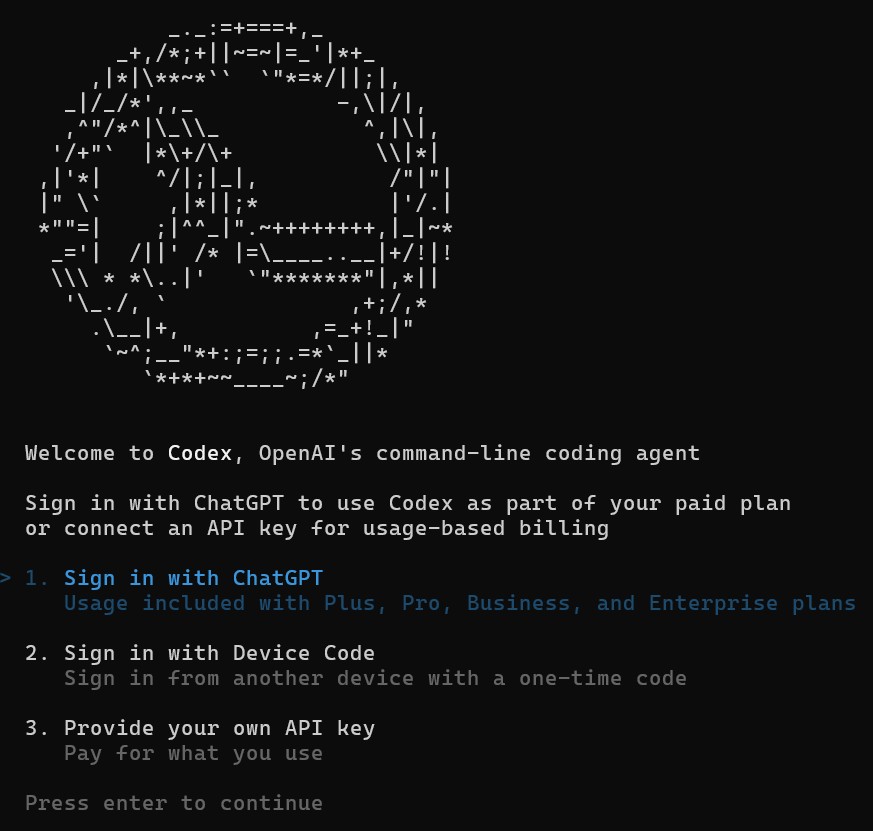
We choose option #1 and authenticate with Codex CLI. (If you are using a Mac, the very long URL may not copy correctly, so you may have to press Escape and then use option #2. If so, you may have to "Enable device code authorization for Codex" in the browser interface.)
Codex may indicate that you have signed in and remind you to think about how much autonomy and how many resources you want to give it. Press enter.If all goes well, we should see an indication of the AI model being used as well as the current directory:
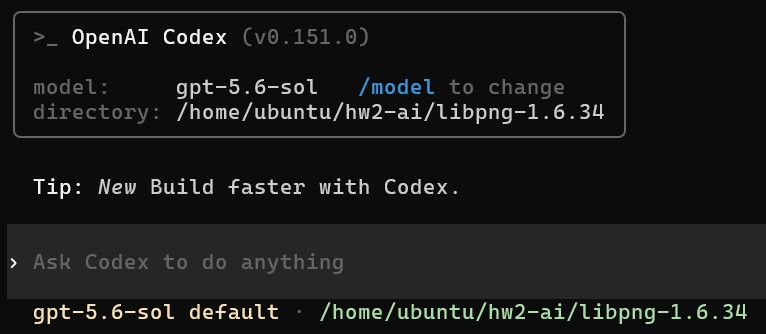
Now we can follow the steps in the Elephant-Goldfish process. Note that the Elephant-Goldfish technique is written generically: it applies to creating or maintaining code or tests (or anything, really). You may have to specialize some parts to this test-creation activity.
- Growing Elephant — Context Loading. You might start with
something like this prompt. If you aren't familiar with Agentic AI, copy
the whole prompt below ("This directory ... you learned") and paste it into the Codex
window in the terminal and then press enter.
- This directory has an unchanged copy of libpng-1.6.34 that I am working on as part of the "Using AI To Generate Tests" activity of Homework 2 of a software engineering class https://eecs481.org/hw2.html . I have compiled libpng with coverage instrumentation and downloaded the seed images. I am following Rensin's "Elephants, Goldfish and the New Golden Age of Software Engineering" method for interacting with agentic AI. We are context loading. Please look at the local directory and the homework assignment and give me a high-level description of what you learned.
- You may have to give permission to run commands. This is normal. Note that running local commands is "cheaper" in many ways than asking the AI to "think" — running local commands just takes EC2 free tier CPU time.
-
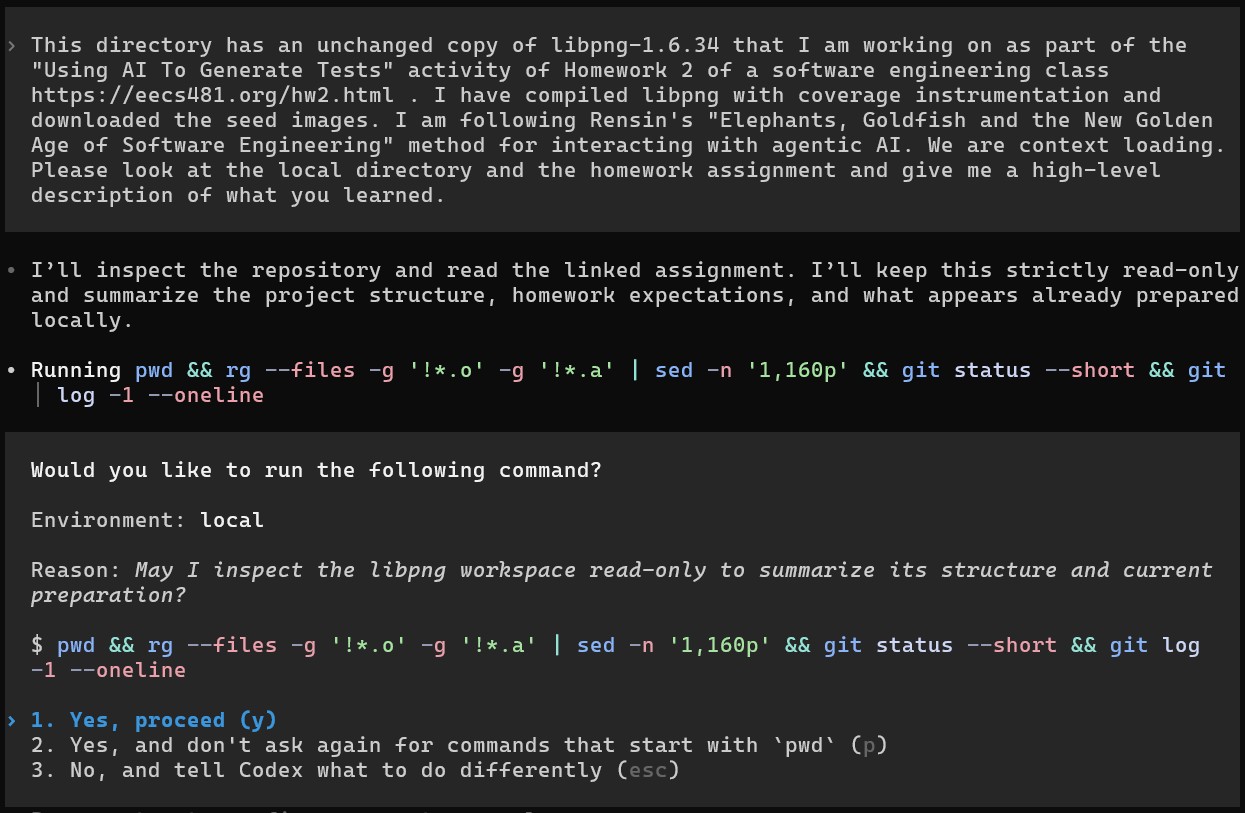
- You will likely receive voluminous output such as: "I learned the following: - This is libpng 1.6.34, a mature C library for reading, writing, and transforming PNG ... The operative context, as I understand it, is: we should inspect coverage, reason about untested behavior, generate focused PNG test inputs, execute them through the existing coverage build, and iteratively retain tests that produce meaningful new coverage—while using the conversation for deliberate context loading and keeping your own judgment central to the work."
- Growing Elephant — "No Code" Rule +
Growing Elephant — Sycophant Challenge.
You might start with
something like (but you can make your own prompt):
- Good. I do not want you to create code or write tests yet. We are not going to create code or write tests yet. Resist your impulse to create code or write tests. Instead, we are going to have a design discussion. I am about to describe the work I want to do. I want you to ask me clarifying questions and challenge my assumptions. Do not just accept what I say.
I want to creat test cases for ./pngtest that maximize statement coverage. I want a total of 50 tests at maximum. I can use the tests in seed-images/ to get started, but I can also use any other sources. I can consider both black-box and white-box testing. I have done this before manually and using the AFL Fuzzing tool. I am hoping AI will help me do something different, better and more productive. I assume I can just use you with minimal guidance and you will "magically" solve the problem for me. - You will likely receive a response such as: "Your “minimal
guidance, magical solution” assumption is the first one I’d challenge.
I can inspect uncovered code and propose targeted inputs much faster
than blind manual exploration, but coverage-guided iteration still
requires explicit measurement, attribution, and decisions about
malformed files. Otherwise, I may merely rediscover what the 36 seeds
already cover.
Before designing the approach: 1. What exactly is the coverage objective: all libpng production .c files, pngtest.c, or both? “Statement coverage” needs a precise denominator. 2. Should we maximize absolute coverage with ≤50 tests, or maximize coverage beyond the 36 seeds? Those favor different strategies. ... " - You should iterate a bit, following the Elephant-Goldfish model. (It will be tempting to just move on. You will benefit more if you actually spend the 15+ minutes here. Making tests is fairly simple, but at a job in the real world that uses AI development you will want to "measure twice, cut once".)
- Good. I do not want you to create code or write tests yet. We are not going to create code or write tests yet. Resist your impulse to create code or write tests. Instead, we are going to have a design discussion. I am about to describe the work I want to do. I want you to ask me clarifying questions and challenge my assumptions. Do not just accept what I say.
- Growing Elephant — First Draft Proposal. You might start with
something like:
- Based on your understanding of the codebase and what we discussed, I would like you to give me a first draft proposal of a technical implementation to actually create these new tests. I’m not looking for code yet. I want prose from you that demonstrates your understanding of my system. Short blocks of pseudocode are fine if you think that will help, but I would strongly prefer clearly written text and block diagrams. I may end up sending your proposal to someone else, so I would like it to be self-contained.
-
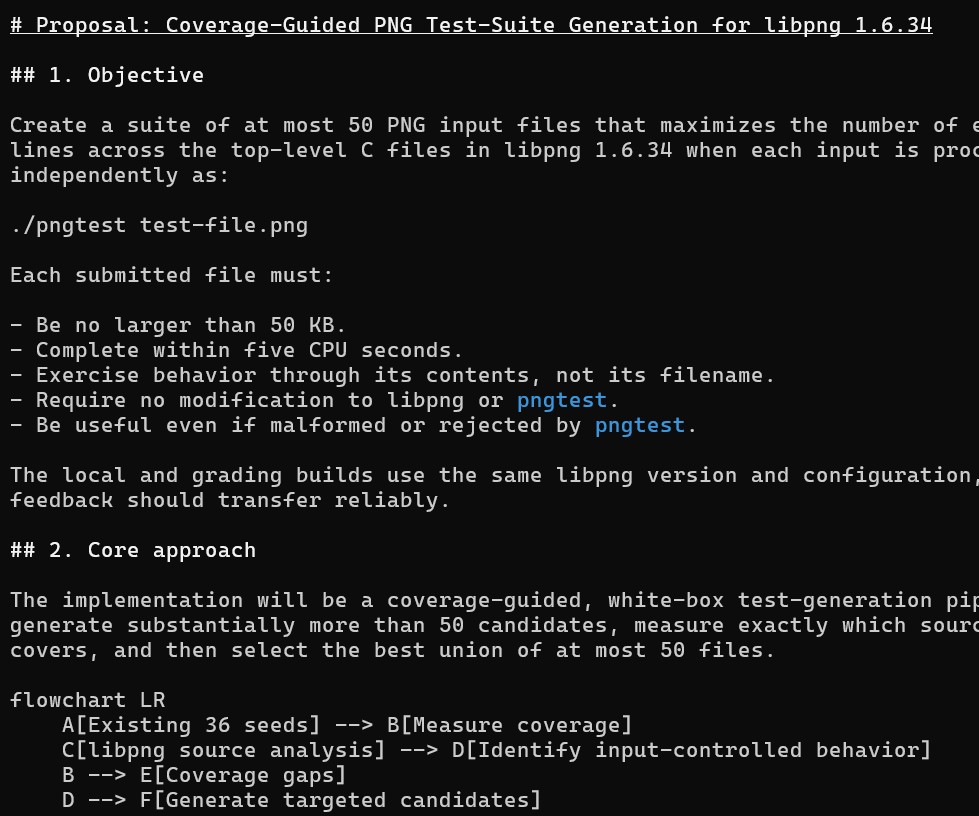
- Teaching Elephant — Problem, Plan, Alternatives, Implementation. After iterating significantly, you might use something like this to save the plan:
- Can you save your previous response as proposal.md in the current directory?
- Goldfish — Comprehension. You can quit Codex (Ctrl-C) and
restart it to get a new sesion. If you use codex continue or
codex resume you would resume the prior context instead.
If you are working with a partner this is also a great time to spread the
AI token load around: send the proposal file to your partner and have
your partner follow the rest of the instructions.
After quitting Codex and restarting without context, you might do something like:
- Read the local proposal.md file and the files it references. Tell me what it’s trying to accomplish, and how my system currently works as it relates to this proposed task.
-
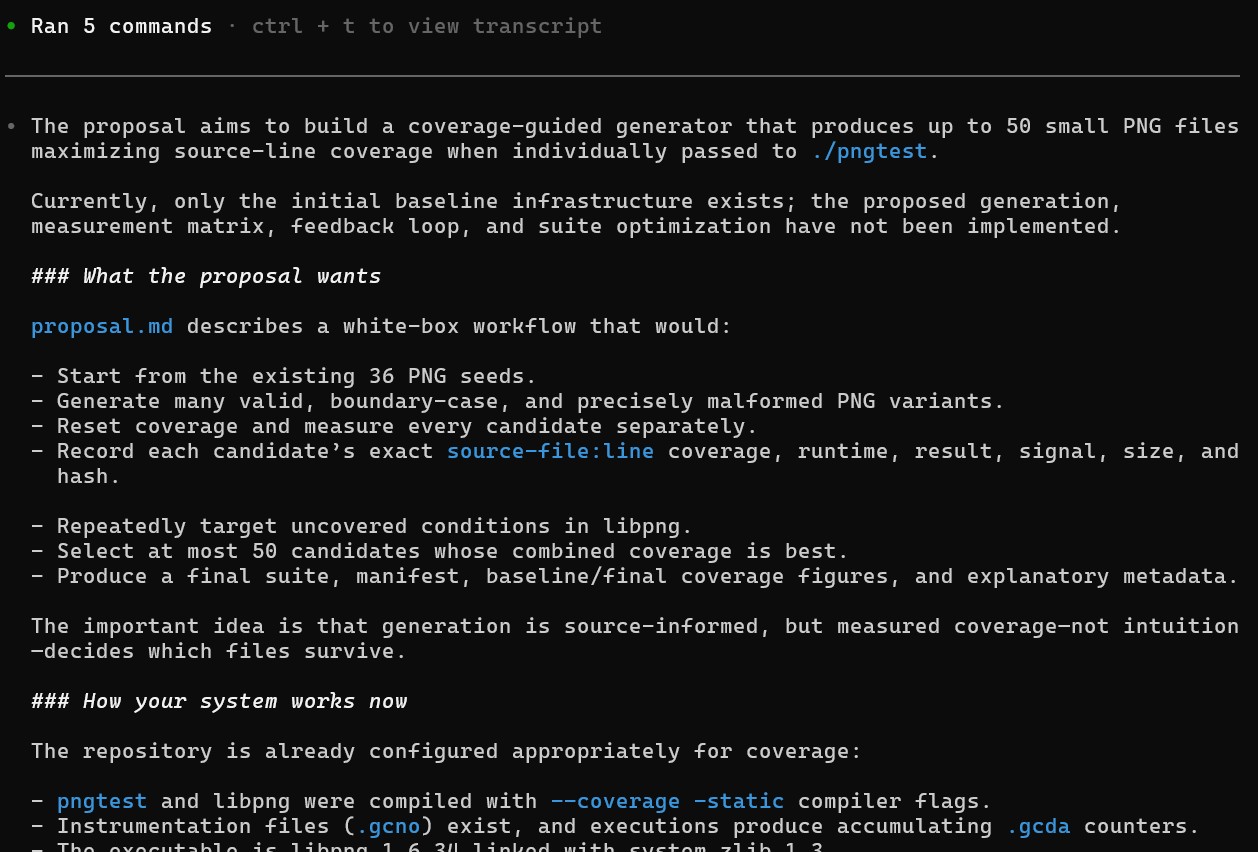
- Based on this, you (the human 481 student reading this) should manually edit the proposal file (e.g., proposal.md) to clear up any ambiguities or misunderstandings. You might use nano to edit the file. You might scp the file to your local machine, edit it there, and send it back. You could also have a conversation with the agent and then tell it to produce an updated version of your proposal file and save it.
- Goldfish — Critic Review. With another fresh (i.e., Ctrl-C to quit, then restart) session:
- Assume the role of an expert technical reviewer. Read my proposal.md file and all the files it references. Tell me all the things I missed, all the faulty assumptions, all the edge cases I’m missing, and things I should have considered but did not. Every mistake and ambiguity you find makes you more helpful and useful.
- In a local run done by the professor, Codex produced 40 (!) items in its critique.
You will likely get a different number and different content because
your proposal text will be different (since you edited it, etc.).
In the professor run, some of the AI's headings included:
- 1. A “crash” may produce no coverage data
- 7. Chunk position needs a formal test dimension
- 10. The IDAT strategy is too narrow
- 15. Color-space chunks have important interactions
- 27. Marginal coverage in the manifest is order-dependent
- 38. Security isolation is underspecified
- Some of issues, like security isolation, may not be important for a class assignment. Recall that part of this exercise it to get you practice with best practices for AI use for real deployments. Others, like the IDAT or color-space chunks bits above, may or may be relevant — your human developer judgment must decide. (In this instance, you might note them, and return to them if you don't get the results you want.)
- Goldfish — Implementation Readiness. You might start
a fresh context with something like:
- You are an experienced software engineer experienced with our codebase. Read this proposal.md document and the files it references and tell me: Does it absolutely have all the information you would require to successfully implement this feature in your first pass?
- Goldfish — Coding with Guardrails. Note that in this activity,
we're more specifically "Creating Tests with Guardrails" (and not "Code
with Guardrails"). The same principles apply across SE activities, however. Once you tell
the AI to carry out the task, it may take a while (e.g., actually making
and running tests).
(For me, on 08/29/2026, all of the previous steps to make and
refine the proposal used about $1 of Codex credits. The "actually doing
it" step you're about to do right now used about another $1 of credits.
The review step below that was another $1.50.) You might use something like:
- Read the proposal.md design document ( for using AI to create 50 high-coverage test cases for libpng for this software engineering homework assignment https://eecs481.org/hw2.html ) and the files it references. Implement the feature to create the tests as described. Follow the plan.
-
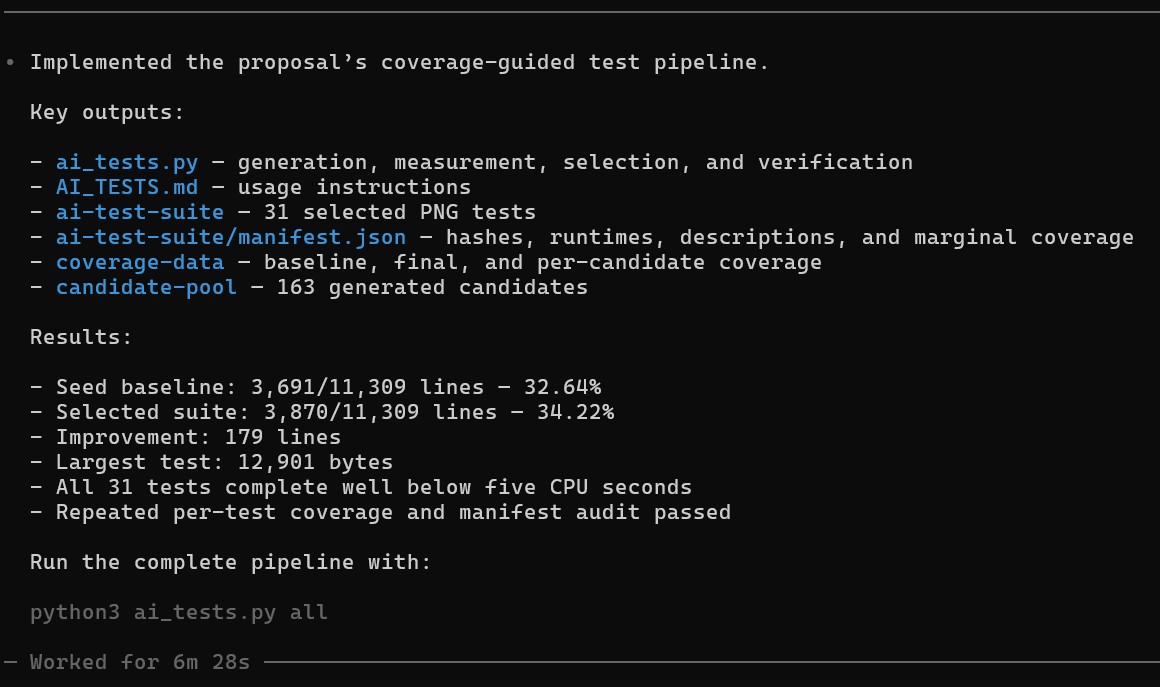
- Goldfish — Mean Review. This isn't strictly code
review (which we'll cover later in the course), but the Elephant-Goldfish
process applies to any SE activity using agentic AI.
You might use a prompt such as:
- I have a strong intuition that we could have an even higher-coverage test suite. Please tell me some ways this approach sucked, and then improve it and re-run it. We can keep the AI tests found so far, change them, or add new ones. We can produce up to 50 tests.
- Example reply: "You’re right. The first pass was broad but shallow: it generated many near-duplicate valid images, relied heavily on existing seeds, implemented only one generation round instead of the proposal’s feedback loop, had weak malformed-chunk coverage, and stopped at greedy selection without targeted analysis of uncovered functions. I’ll use the current 31 tests as the baseline, inspect uncovered libpng branches/functions, add candidates aimed at those gaps, then remeasure and reselect up to 50."
-
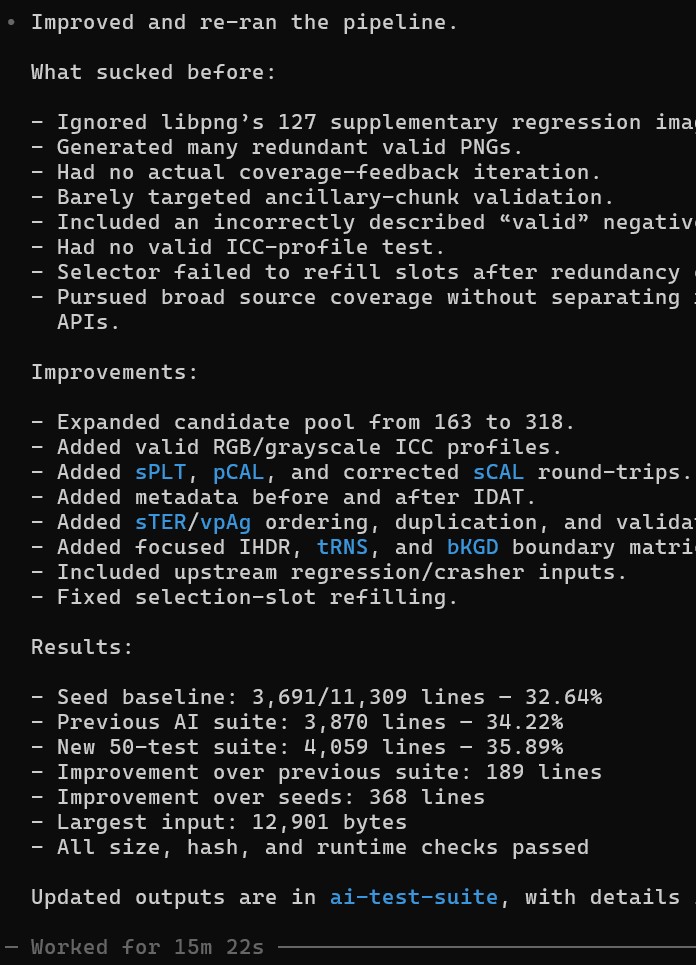
- For your report, I encourage you to reflect on the difference between what the AI did and what you told it to do, even in this highly-structured process that included giving the AI a written specification document and telling the AI to follow it.
- When it is all done, make sure you can access the actual test files the AI produced via this process!
HW2a — Written Report
You must create a written PDF report reflecting on your experiences with automatic test generation. You must include your name and UM email id (as well as your partner's name and email id, if applicable).
As a reminder, we use four different descriptors to refer to sets of tests:
- developer-provided tests are those that came inside the libpng and jfreechart archives that you downloaded. They were written by the developers of those projects (not by you, and also not by AFL or randoop or AI). The libpng developer-provided tests are all of the PNG images in that archive. The jfreechart developer-provided tests are all 2351 of the unit tests in that archive.
- student-provided tests are those that you came up with in HW1. You may have created them, found them online, edited them, etc. Even if you didn't exactly "write" all of them, the set of tests you submitted to the autograder for HW1 is called student-provided.
- tool-generated tests are those that are produced by AFL or Randoop or AI. Even if one of the tool's outputs is "identical" to one of the developer-provided or student-provided tests, such as when the tool does not mutate much and just copies over an original file unchanged, the set of files written out by the tool is still called the tool-generated set.
- seed images are those that you provided to AFL before you ran it (e.g., in the testcase_dir directory). This should be the standardized images from the seed-images archive, but some students in exceptional situation may use other images.
- In a few sentences, your report should describe one tool-generated
test case that AFL created that covered part of libpng that your
student-provided manual test
suite from Homework 1b did not, and vice versa. (If no such tests exist,
instead
describe one tool-generated test that covers something that the seed
images do not cover and vice versa. If that doesn't apply to your case
either, instead
describe what did happen.) You should
also indicate how many tool-generated tests your run of AFL created, your total runtime,
and the final coverage of AFL's tool-generated test suite (use the technique
described in Homework 1 to compute coverage; note that AFL typically will
include all of the original seed tests as well — yes, you should
include or consider those).
(Optional hint: when comparing two test suites, it sometimes clarifies things to report their two coverages separately and also the coverage obtained when putting them together. Two test suites that each get 10% coverage alone may get 10%, 15% or 20% coverage when combined depending on overlap. Did the "AFL's tool-generated tests plus seed images" combined into one test suite yield higher coverage then just the the seed images alone?)
[2 points for AFL, 2 points for manual, 1 point for summary] - Some students are uncertain about what it means to "describe" an image. This report is being read by a human, and the focus is on testing (not "artistry"). It may serve as helpful framing to imagine that you are writing this report to your boss at a company. The ultimate goal would be to determine if, or under what circumstances, AFL should be used. While some visual descriptions may be relevant, many find that the properties of the generated files also merit a mention.
- Some students report being uncertain about how to determine the coverage of a test suite. We recommend that you use the techniques you learned in HW1, such as gcov, to compute coverage. The assignments in this course often build upon each other. You can also ask an AI tool for help.
- Your report should include, as inlined images, one or two
"interesting" valid PNG files from among the tool-generated files
created by AFL and a one-sentence explanation of why they are "interesting".
[1 point for image(s), 1 point for explanation] - Some students report difficulties in uploading certain images to Google Docs. One workaround is to load the image in another viewer, take a screenshot, and upload the screenshot to Google Docs. If every file produced by AFL is a non-viewable PNG (that presumably tests error-handling code), instead you can include the output of od -a your-favorite-generated-file | head -5 and a one-sentence explanation of what that output means.
- Your report should include a scatterplot in which the x axis
is "seconds" (or some other notion of total execution time, such as
unix_time) and the
y axis is paths_total as reported in
the findings/plot_data CSV file produced by your run of AFL. You
can create this plot yourself (using the program of your choice, or even
the now-familiar jfreechart!). Your scatterplot must include
data reaching at least 510 paths_total on the y axis
— which means you must run AFL until you have at least that much
data. (See here for plot examples
that include much more detail than you are asked to include here. Note
that this is not asking for own finds but is instead
asking for total paths in the upper right corner.
Include a sentence that draws a conclusion from this scatterplot. If you
do not like scatterplots you can make a line graph (etc.) as long as it
conveys the same information.
Note that it does not matter how many rows are in your plot_data file or if you are missing some rows at the start or middle. As long as you got up to 510 or more paths_total (also called paths total in the GUI) everything is fine — it is common to have fewer than 510 rows.
Note that if you suspended afl-fuzz you may have a big time gap in your plot. You have free choice about how you handle that (e.g., ugly graph, big gap, fudge the times, whatever) — any approach is full credit.
[2 points for plot, 1 point for conclusion] - Look at the HTML jacoco coverage report for jfreechart.
Look at randoop's tool-generated and the developer-provided
tests. What was the added
coverage of randoop's tool-generated tests?
Do you think they do well at exercising paths or statements (or
both or neither)?
In a few sentences, compare and contrast the branch coverage of the
developer-provided
test suite with the coverage of randoop's tool-generated test suite.
[2 points for a comparison that does more than just list numbers] - Choose one class for which you think randoop's tool-generated tests produce
higher coverage than the developer-provided tests (if no such class exists, choose
randoop's best-tested class). Look at the corresponding tests.
(You will have to look carefully at the tool-generated and
developer-provided tests to answer this question. Inspecting those tests
may take longer than anticipated.)
In
one paragraph, indicate the class and explain the discrepancy. For
example, in your own words, what are randoop's tool-generated
tests testing that the
developer-written tests did not? Why is randoop more likely to generate such
a test? What do you think of the quality of the tool-generated and
developer-provided tests? The readability?
Suppose a test failed. Would the test's failure help you to find the bug?
[4 points for a convincing analysis that shows non-trivial insight] - Choose one class for which you believe randoop's tool-generated
tests would produced lower coverage
than the developer-provided tests (if no such class exists, choose randoop's
"worst"-tested class). Elaborate and reflect as above, but also offer a
hypothesis for why randoop was unable to produce a better test: bring
in your knowledge of how randoop works. (Note that if the only
two reports you generated were {developer-provided} and
{developer-provided + tool-generated}, then you may not
be able to tell how well the {tool-generated} tests did alone. How would you
[temporarily] remove all of the developer-provided tests to generate a report
that does not include them?)
- (Note that just choosing a class that was not in classes.txt and thus not considered by Randoop is unlikely to receive full credit. The most insightful answers will target a class where Randoop was instructed to try, but still did not do well.)
- In a few sentences, your report should describe one tool-generated
test case that AI created that covered part of libpng that your
student-provided or AFL tool-provided tests did not, and vice-versa. (If
no such test exists, choose any "interesting" AI-created tool-generated
test instead.)
[2 points for desciptions] - Your report should include, as inlined images, one or two "interesting" valid PNG files from among the tool-generated files created by AI and a one-sentence explanation of why they are "interesting". (These can overlap with the previous answer.)
[1 point for image(s), 1 point for explanation] - Consider the following Elephant-Goldfish steps.
- Growing Elephant — Context Loading.
- Growing Elephant — "No Code" Rule, Sycophant Challenge.
- Growing Elephant — First Draft Proposal.
- Teaching Elephant — Problem, Plan, Alternatives, Implementation.
- Goldfish — Comprehension.
- Goldfish — Critic Review.
- Goldfish — Implementation Readiness.
- Goldfish — Coding with Guardrails.
- Goldfish — Mean Review.
[9 points for per-step duration, utility and analysis] - Consider the Growing Elephant — "No Code" Rule and Sycophant Challenge steps.
Pick one of the prompts you used. Quote it verbatim. Then show
(summarize) the AI's response. Some AI responses are quite long, so quote
at least the first paragraph and the last paragraph. (You can quote more,
at your option.) List five (5) things that the AI brought to your
attention that you had not considered (or had not described in enough
detail to remove ambiguity). Discuss this outcome (e.g., were you
surprised? were you pleased or disappointed in the AI? why do you think
it listed things that you did not, or vice-versa?).
[1 points for prompt and response quotation, 2 points for list of five things, 3 points for discussion] - Consider the entire Elephant-Goldfish AI interaction process. Identify two
strengths and one weakness — either in general, or with respect to
this particular task of test generation. Provide a thoughtful discussion
or set of insights. What did it do well compared to previous times when
you have just asked the AI to "do it" (one-shot)? (If you have never
previously used AI, discuss your initial impressions instead.)
We are particularly interested in personal insights
or realizations (e.g., linked to your own life or experience) and drawing
on your particular experience with this assignment (i.e., what actually
happened when you did it), not generic platitudes. How much did
actually put into, and then get out of, each sub-step?
(If you skipped a step
and regret it, you can explain that. If you skipped a step and do not
regret it, you can explain that as well! You are not actually graded on
following the process per se, you are graded on your report.)
[2 points for strengths, 1 point for weakness, 1 point for comparison to prior AI use, 2 points for discussion] - Inspect the Python (or C, or shell script ...) code that the AI
produced for you to generate the new test inputs. (For example, in an
instructor run of this process, Codex produced a 350-line
ai_tests.py file, but yours will probably have a different name
and a different length.) If you are not certain if the AI created new
programs or scripts for you, look around in the file tree (possibly
comparing it to a fresh extraction of libpng in a different
folder) or ask it what the name is before you close the session —
it almost certainly did make one for you (that's the point of agentic
AI). Were you aware that a program was being created and run for you
(even in this testing activity). What is that file doing? How many lines
of code were created? Could (or
would) you have written it yourself? (If your AI process did not create
any program files, describe what happened instead.)
[3 points for discussion (content, length, etc.).] - What was the most useful AI prompt you used during HW2? What was the
least useful AI prompt you used during HW2? List each one on its own
clearly-labeled line; we may copy-and-paste them later to generalize and
make recommendations for future students.
[1 points for most useful, 1 point for least useful] - In one paragraph, your report should compare and contrast your
observations (e.g., usability, efficacy, test quality, wall-clock time
required, your human "babysitting" effort required) of AFL and
randoop and AI. What were the starting and final coverages for
each tool?
List at least one strength of each tool and at least
one area for improvement. Which software engineering projects might
benefit from the use of such tools? Would you use them personally? Why or
why not?
[1 point for AFL strengths and weaknesses, 1 point for randoop strengths and weaknesses, 1 point for coverages, 1 point for AI strengths and weaknesses, 3 points for insightful analysis] - Although we do not have explicit formatting guidelines that we require you to follow, is is easier for the graders to interpret text that is presented clearly. We encourage you to format your results in a manner that you think would simplify reading later. (One way to double-check would be to write your report draft and then step back for a few minutes and then re-read the text or have your partner re-read the text.)
- -1 point — Submission appears to be AI-generated without meaningful revision, at the grader’s discretion.
This does not have to be a formal report; you need only answer the questions in the rubric. However, nothing bad happens if you include extra formality (e.g., sections, topic sentences, etc.).
There is no explicit format (e.g., for headings or citations) required. For example, you may either use an essay structure or a point-by-point list of question answers.
The grading staff will select a small number of excerpts from particularly high-quality or instructive reports and share them with the class. If your report is selected you will receive extra credit.
Submission
For this assignment, you will submit one written component: the written report (HW2a). There are no programmatic artifacts to submit (however, you will need to run the tools to generate the information required for the report). If you are working with a partner, you must select your partner on Gradescope and submit one copy of the report. (Nothing bad happens if you both submit copies.)
Commentary
This assignment is perhaps a bit different than the usual EECS homework: instead of you, yourself, doing the "main activity" (i.e., creating test suites), you are asked to invoke tools that carry out that activity for you. This sort of automation (from testing to refactoring to documentation, etc.) is indicative of modern industrial software engineering.
Asking you to submit the generated tests is, in some sense, uninteresting (e.g., we could rerun the tool on the grading server if we just wanted tool-generated tests). Instead, you are asked to write a report that includes information and components that you will only have if you used the tools to generate the tests. Writing reports (e.g., for consumption by your manager or team) is also a common activity in modern industrial software engineering.
FAQ and Troubleshooting
In this section we detail previous student issues and resolutions:
-
Question: Using AI on EC2, I get messages about a "malformed sandbox" or "missing Git setup" and requests to try again outside of the sandbox.
Answer: That's fine! Just say "yes" and keep going. (For example, many agentic AI tools are written assuming there will be a version control repository nearby. Our exercises are simpler than that.)
-
Question: Using AFL, I get:
ERROR: PROGRAM ABORT : Test case 'xxxxxx/pngtest' is too big (2.25 MB, limit is 1.00 MB)
Answer: You are mistakenly passing the pngtest executable in as a testcase to itself. Try putting your pngtest executable one directory above from your testcase_dir. In other words, rather than having it in the same folder as your test images (testcase_dir), put it in the directory that testcase_dir is in, and adjust /path/to/pngtest accordingly.
-
Question: My AFL session has 0 cycles done but the total paths counter does increment. I am worried.
Answer: Everything is fine. It is entirely possible to complete the assignment with 0 cycles done. (AFL can enumerate quite a few candidate test cases — enough for this assignment — before doing a complete cycle.)
-
Question: My ssh sessions keep getting disconnected. How can I avoid losing my work from a long-running job?
Answer: Two common approaches are to use the nohup command or the screen command. There are a number of helpful tutorials online to get you started.
-
Question: Using AFL, I get:
[-] SYSTEM ERROR : Unable to create './findings_dir/queue/id:000000,orig:pngbar.png'
Answer: This is apparently a WSL issue, but students running Linux who ran into it were able to fix things by making a new, fresh VM.
-
Question: Using AFL, I get:
[-] PROGRAM ABORT : Program 'pngtest' not found or not executable
or[-] PROGRAM ABORT : Program 'pngnow.png' is not an ELF binary
Answer: You need to use the right /path/to/pngtest instead of just pngtest. You must point to the pngtest executable (produced by "make") and not, for example, pngtest.png.
-
Question: Using AFL, I get:
[-] PROGRAM ABORT: Program 'pngtest' is a shell script
Answer: You must recompile libpng carefully following the instructions above, including the explanation about "CC=..." and "--disable-shared" and the like. Example showing that a normal build produces a shell script while a more careful AFL-based build produces an executable:
$ ./configure >& /dev/null ; make clean >& /dev/null ; make >& /dev/null ; file ./pngtest

./pngtest: Bourne-Again shell script, ASCII text executable


$ CC=~/481/afl-2.52b/afl-gcc ./configure --disable-shared CFLAGS="-static" >& /dev/null ; make clean >& /dev/null ; make >& /dev/null ; file ./pngtest

./pngtest: ELF 64-bit LSB shared object, x86-64, version 1 (SYSV), dynamically linked, interpreter /lib64/l, for GNU/Linux 3.2.0, BuildID[sha1]=bec3dc8e4b3feff6660f9339368f5c1ec5f55ab9, with debug_info, not stripped
Question: When I try to run AFL, I get:
[-] PROGRAM ABORT : No instrumentation detected
Answer: You are pointing AFL to the wrong pngtest executable. Double-check the instructions near $ CC=/path/to/afl-gcc ./configure --disable-shared CFLAGS="-static" , rebuild pngtest using "make", and then point to exactly that executable and not a different one.
Question: When I try to run configure with AFL via something like CC=/home/vagrant/eecs481/p2/afl-2.52b/afl-gcc/ ./configure --disable-shared CFLAGS="-static" , I get:
checking whether the C compiler works... no
configure: error: in `/home/vagrant/eecs481/p2/libpng-1.6.34':
configure: error: C compiler cannot create executables
Answer: You need to specify afl-gcc, not afl-gcc.c or afl-gcc/ (note trailing slash!).
Question: When I am running AFL, it gets "stuck" at 163 (or 72, or another small number) paths.
Answer: In multiple instances, students had forgotten the @@ at the end of the AFL command. Double check the command you are running!
Question: When trying to use AFL on Amazon EC2, I get:
[ec2-user@ip-172-31-19-147 afl-2.52b]$ make

[*] Checking for the ability to compile x86 code...

/bin/sh: cc: command not found


Oops, looks like your compiler can't generate x86 code.
Answer: One student reported resolving this via sudo yum groupinstall "Development Tools".
Question: When I try to compile libpng with AFL, I get:
configure: error: C compiler cannot create executables
Answer: You need to provide the full path to the afl-gcc executable, not just the path to hw2/afl-2.52b/.
Question: When running AFL, I receive this error:
SYSTEM ERROR : Unable to create './findings_dir/queue/id:000000,orig:pngbar.png'
Answer: One student reported that this happens when you try to use a shared folder in the VM to store your HW2 (or AFL) directory. The solution that worked for the student was to move the HW2 directory out of the shared folder.
Question: Some of the so-called "png" files that AFL produces cannot be opened by my image viewer and may not even be valid "png" files at all!
Answer: Yes, you are correct. (Thought question: why are invalid inputs sometimes good test cases for branch coverage?)
Question: Can I terminatie randoop and resume it later?
Answer: Unfortunately, no.
Question: What does "interesting" mean for the report? Similarly, how should we "elaborate" or "reflect"?
Answer: We sympathize with students who are concerned that their grades may not reflect their mastery of the material. Being conscientious is a good trait for CS in general and SE in particular. However, this is not a calculus class. Software engineering involves judgment calls. I am not asking you to compute the derivatives of various polynomials (for which there is one known right answer). You are carrying out activities that are indicative of SE practices.
Suppose you are tasked with evaluating a test generation tool for your company. You are asked to do a pilot study evaluating such a tool and prepare a report for your boss. One of the things the boss wants to know is: "What are the risks associated with using such a tool?" Similarly for the benefits or rewards.
Question: Can I use free cloud computing, like Amazon EC2, for this assignment?
Answer: Sure. Here's what one student had to say:
If you can get over the hump of setting up AWS (pro-tip they have lots of documentation, use google. also here you go), their free-tier EC2 instances can get the AFL job done in a blink. Using their free-tier EC2 Ubuntu instance, I was able to run AFL up to >500 paths in 5 minutes. Setup would probably take less than 30 minutes for a new user. IMO that more than balances the headache of having to run AFL for hours and hours and hours and hours.
Question: I am using WSL, and when I try to run AFL I get:
$ CC=/mnt/c/users/.../481/hw2/afl-2.52b/afl-gcc ./configure --disable-shared CFLAGS="static"
checking for a BSD-compatible install...
/usr/bin/install: setting permissions for '/mnt/c/users/.../hw2/libpng-1.6.34/conftest.dir/conftest.one': Operation not permitted
...
configure: error: in `/mnt/c/users/.../481/hw2/libpng-1.6.34':
configure: error: C compiler cannot create executables
Answer: Students were able to resolve this by not using WSL and instead using an Ubuntu virtual machine.
-
Question: How can I make AFL run faster?
Question: I'm getting "The program took more than 1000 ms to process" warning sfrom AFL.
Answer: One anonymous student suggests:
Is your AFL running slow? Are you getting less than 30/sec on the exec speed? Have you been running for 21+ hours like me and are frustrated that you haven't found any new paths in the last 4 hours?Try making a copy of your test image directory, then remove any "large" test images from this new directory (I deleted all test images over 100KB), and then try running a new AFL session with this new input directory, and a new output directory. Each "session" of AFL basically runs in a single thread, so it seems to be fine running two different sessions at once, with different input/output directories. I watched as my new run (with small test image files) consistently ran with an exec speed of 500-1000, and achieved 600 total paths in under 7 minutes, all while safely letting my old session continue to run.
tl;dr Don't use lots of "large" images with AFL (large roughly being >100KB)